
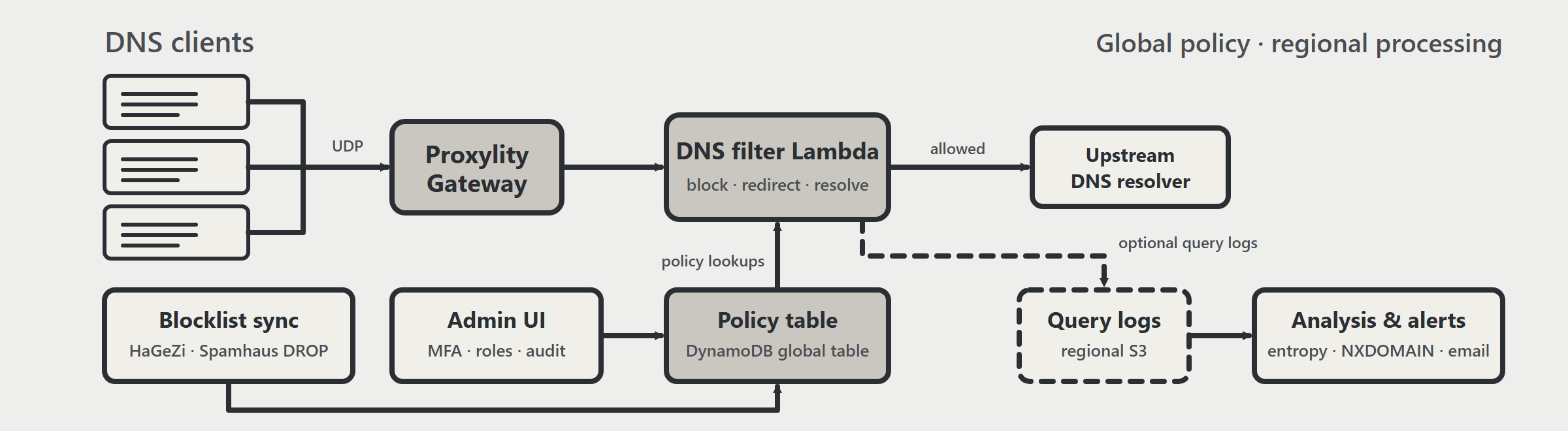
When we published Run Your Own Serverless DNS, the example was a proof that a DNS filter could be a few Lambda functions and a DynamoDB table instead of a fleet of servers. The natural next questions are the operational ones: how do you keep the blocklist current, and who gets to change it?
Today's update answers both, and a good deal more. The DNS Filter example has been substantially reworked, and it now lives in its own repository: github.com/proxylity/dns-filter. The history came along with it.
Why a repository of its own
The example grew from a couple of Lambda functions into a small system: global, regional, sync, and admin
CloudFormation templates, a blocklist sync worker, a web app, and a test suite. That's more than a
folder in a collection of examples should carry. A dedicated repository gives it its own releases,
issues, and pull requests, and a README that can focus entirely on deploying and operating the
service. The old examples/dns-filter folder now contains a single note pointing to the new
location.
Blocklists that maintain themselves
Previously you loaded blocklists yourself. Now a sync stack does it for you. On a schedule (every 8 hours by default) a worker built on .NET 10 imports HaGeZi domain lists in a Light, Balanced (the default), or Strict profile, along with the Spamhaus DROP network list. Git history makes this efficient: after the first import the worker reads only the lines that were added or removed since the last successful commit.
Managed entries are marked in the policy table with the lists that supplied them, so removing one source doesn't unblock something another source still covers. Entries you created yourself are never overwritten, and a conflict is reported rather than resolved silently. If you'd like to deploy the infrastructure before trusting it with production data, the worker has a validate-only mode that checks configuration without importing anything.
An admin UI, with the controls an admin UI needs
Policy used to mean reading and writing DynamoDB items. The new admin web app gives you pages for
domains, IP/CIDR ranges, and ASNs, plus audit and sync status views. It's built on Lambda web
functions, with sign-in through Cognito managed login and MFA required. Access is by group: admin
can change policy, viewer can only look. Every change is written to the table in the same
transaction as its audit record, with the actor, the target, and the before and after values, so a
change and its trail can't diverge. The Cognito app client accepts a list of identity provider names,
so SAML and OIDC federation is a configuration step, though worked examples for it are still on the
roadmap.
Alerts that ask a human
The analysis pipeline already flagged suspicious domains. It checks for a high NXDOMAIN ratio, many
unique subdomains, long or numerous labels, and both Shannon and relative entropy, all computed
asynchronously from the regional query logs. Now you can have those findings sent by email. Set one
parameter and each region gets an encrypted SNS topic and an EventBridge rule for the
suspicious-domain events.
The email includes the domain and the reasons it was flagged, with a link to the admin UI that opens a
prefilled rule form. We were deliberate about what the link doesn't do: opening it changes nothing, and
an admin still has to review and submit the block. Detection is a signal, and a person
makes the call.
Operated like infrastructure
This is the part that moves the example from a demonstration toward something you could run. Regional data buckets use customer-managed KMS keys with rotation, and the global policy table keeps point-in-time recovery. Query logs and operational logs have separate retention settings. CloudWatch dashboards show DNS invocations, errors, latency, DynamoDB consumption, and sync builds, and alarms cover resolver errors, failed delivery of query logs to S3, and failed or missing sync builds. You connect the alarm actions to wherever your team listens.
Privacy is designed in, not bolted on. Operational logs never record queried names or client IP addresses. If you enable query logging, the records contain the domain, query type, response code, and answers, but never the client IP, and they stay in the region that handled the query.
This is a reference solution that you deploy and operate in your own AWS account, not a managed service. New block rules take effect after the policy cache expires, and the UDP listener may use a non-standard port, so clients that need port 53 require address translation. Browsing very large rule sets, curated profiles beyond the HaGeZi tiers, and federation examples are on the roadmap. The README documents all of it.
Upgrading and getting started
New to the example? Clone the new repository and follow its README:
git clone https://github.com/proxylity/dns-filter.git
cd dns-filter
Already running the original? The README has a section on deploying updates. In short, use the same AWS account, home region, and stack names, restore your original configuration options, and change only what you intend. Several changes affect existing resources, such as new log group names and KMS-encrypted buckets that don't re-encrypt existing objects, so read the notes before you deploy. The repository includes unit tests for both the .NET services and the admin app, so you can run them against your own changes.
The original walkthrough is still a good introduction to the architecture. For the capabilities in context, see the DNS filtering use case. Pull requests are welcome.