 Proxylity
Proxylity
Proxylity
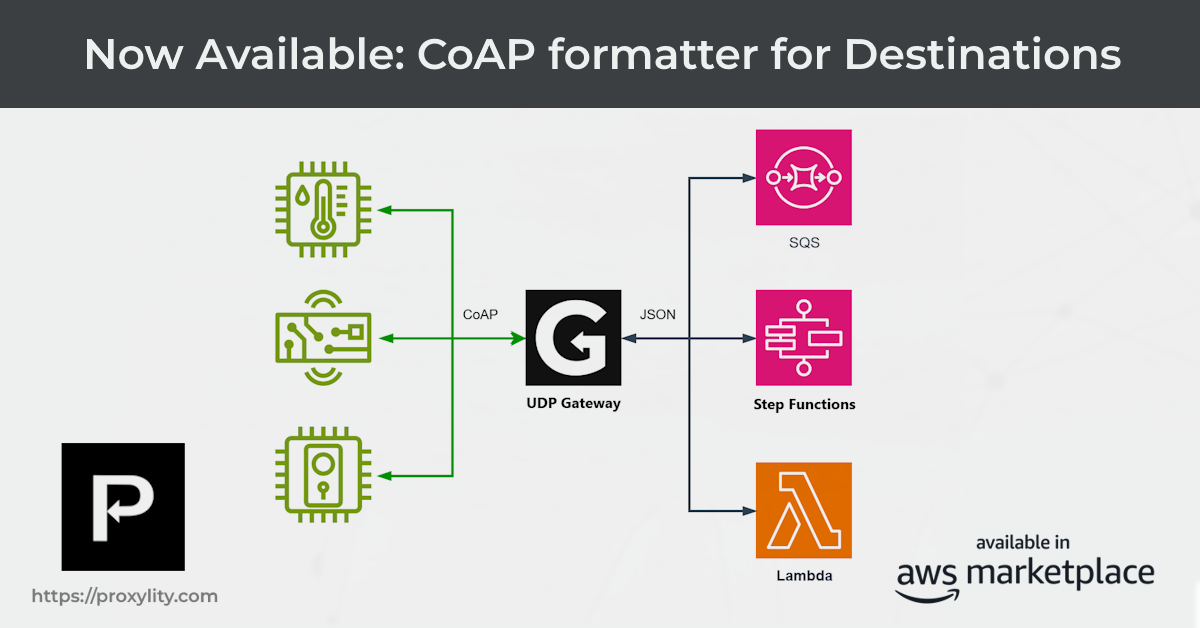
Proxylity UDP Gateway now ships a native formatter for the
Constrained Application Protocol
(CoAP). Set Formatter: coap on any destination and UDP Gateway will automatically
decode the binary wire format of each inbound CoAP packet into a structured JSON object before delivery —
no Lambda glue code, no custom deserialisation, no binary wrangling in your state machine. Building a
serverless CoAP API on AWS is now a configuration exercise.
CoAP is the UDP-based cousin of HTTP. It was designed from the ground up for constrained environments — microcontrollers with kilobytes of RAM, sensor nodes running on coin-cell batteries, mesh networks where every byte costs energy. The IETF published CoAP as RFC 7252 in 2014, and it has since become the application-layer protocol of choice for a wide range of IoT deployments.
The design philosophy will feel immediately familiar to any web developer:
coap://device.example.com:5683/sensors/temperature — scheme,
host, port, and path, exactly as you would expect.Where CoAP departs from HTTP is in the transport and message reliability model. Because UDP provides no delivery guarantees, CoAP builds its own lightweight reliability layer directly into the message header. A Confirmable (CON) message must be acknowledged by the recipient with an ACK; if no ACK arrives within a retransmission timeout the sender tries again, up to a configurable maximum. A Non-confirmable (NON) message is fire-and-forget — appropriate for high-frequency sensor readings where losing the occasional sample is acceptable. This duality maps naturally onto UDP: CON messages give you reliability at the cost of a round-trip; NON messages give you throughput at the cost of guaranteed delivery.
The result is a protocol that speaks in familiar HTTP concepts but travels at UDP speed, across networks that would bring HTTP to its knees.
For years, building a CoAP service meant running a C or Python server on a VM, managing certificates and retransmission logic by hand, and hoping the instance stayed up. The protocol was designed for constrained clients — but the servers ended up anything but constrained.
Proxylity UDP Gateway inverts the model. The gateway handles all the UDP plumbing: it terminates CoAP traffic at the edge, batches packets for efficient processing, and delivers them to your AWS resources. Your backend only sees clean JSON. It never touches a socket, never parses a byte, and scales to zero when there is nothing to do.
The new coap formatter is the missing piece that makes this practical. Previously, a Step
Functions state machine receiving CoAP traffic would receive the raw binary payload in base64 encoding
and would need custom Lambda states or complex JSONata expressions just to extract the method and path.
With Formatter: coap, those fields arrive pre-parsed and ready to route on.
When Formatter: coap is set on a destination, UDP Gateway decodes each inbound binary CoAP
packet according to RFC 7252 and delivers
the result as a JSON object in the Data field of the request packet. Here is an example
of what a decoded CoAP GET /time request looks like when it arrives at a Lambda function
or Step Functions state machine:
{
  "Messages": [
    {
      "Tag": "abc123",
      "Remote": { "IpAddress": "203.0.113.5", "Port": 12345 },
      "Formatter": "coap",
      "Data": "{\"Version\":1,\"Type\":0,\"Code\":1,\"Method\":\"GET\",\"MessageId\":4711,\"Token\":\"AQID\",\"Options\":[{\"Number\":11,\"Value\":\"dGltZQ==\"}],\"Path\":\"/time\"}"
    }
  ]
}
The Data string, once parsed, contains:
| Field | Type | Description |
|---|---|---|
Version | integer | CoAP version, typically 1 |
Type | integer | Message type: 0=CON, 1=NON, 2=ACK, 3=RST (RFC 7252 §4) |
Code | integer | Method or response code as raw byte. Requests: 1=GET, 2=POST, 3=PUT, 4=DELETE. Responses: e.g. 69=2.05 Content, 132=4.04 Not Found |
Method | string | Convenience field present on request messages (Code class 0): "GET", "POST", "PUT", "DELETE" |
MessageId | integer | Used to match ACKs to CON messages |
Token | base64 | Client-chosen correlation token (0–8 bytes) |
Options | array | Array of {"Number": <int>, "Value": <base64>} objects. Common option numbers: 11=Uri-Path, 12=Content-Format, 14=Max-Age, 60=Size1 |
Path | string | Convenience field with the URI path assembled by joining all Uri-Path option segments (option 11), e.g. "/sensors/temperature" |
Payload | base64 | Application payload bytes (omitted when absent) |
For synchronous response destinations (Lambda and Step Functions), the reply Data must be a
stringified JSON object using the same schema. The Code field accepts either an integer
(e.g. 69) or a dotted-string (e.g. "2.05"). UDP Gateway re-encodes the
reply into valid binary CoAP and sends it back to the client. Here is the reply for a successful
GET /time request:
{
  "Version": 1,
  "Type": 2,
  "Code": 69,
  "MessageId": 4711,
  "Token": "AQID",
  "Options": [
    { "Number": 12, "Value": "AA==" }
  ],
  "Payload": "<base64-encoded UTC timestamp>"
}
The formatter handles the CoAP Confirmable/Non-confirmable contract automatically on ingress — but your backend is responsible for honouring it on egress. RFC 7252 requires that a CON message receive an ACK or the sender will keep retransmitting. A NON message requires no reply. The CoAP time service example demonstrates this routing pattern using a Step Functions state machine.
Setting up a CoAP endpoint is a single line of CloudFormation. Add Formatter: coap to your
destination alongside the usual batching and role configuration:
{
  "UdpListener": {
    "Type": "Custom::ProxylityUdpGatewayListener",
    "Properties": {
      "Protocols": ["udp"],
      "Destinations": [
        {
          "Description": "Decode CoAP requests and deliver to state machine",
          "Role": { "Arn": { "Fn::GetAtt": ["DestinationRole", "Arn"] } },
          "Formatter": "coap",
          "Batching": { "Count": 100, "TimeoutInSeconds": 0.5 },
          "DestinationArn": { "Fn::GetAtt": ["MyStateMachine", "Arn"] }
        }
      ]
    }
  }
}
No other changes are required. The same IAM role, the same batching configuration, the same destination ARN patterns you already use — just swap the formatter.
Note: The coap option is available only on the main destination
Formatter property. Service-specific argument formatters such as
TenantIdFormatter and MessageGroupIdFormatter are limited to
ascii, hex, base64, and utf8.
We built a reference implementation to show the complete picture end to end. The
CoAP Time Service
is a minimal serverless CoAP API that responds to GET /time requests with the current UTC
timestamp. It is implemented entirely with a Step Functions Express state machine — no Lambda cold starts,
no persistent servers, no custom network code.
The state machine illustrates the three behaviours any well-behaved CoAP server must implement:
2.05 Content ACK and the resource
representation.4.04 Not Found ACK. RFC 7252 requires
this; without it the client retransmits indefinitely.Because the formatter has already decoded the binary wire format, the Choice state can inspect
.Type for the message type as an integer (0=CON, 1=NON), .Method
for the request verb ("GET", "POST"…), and .Path for the URI path — no raw packet
parsing, no base64 gymnastics. The full
deploy-to-test cycle is:
sam build && sam deploy --guided, then fire a test request from
coap-client or a raw nc pipe. The
readme has the full
walkthrough.
CoAP is the lingua franca of constrained IoT devices. With the coap formatter,
the full catalogue of UDP Gateway destinations is now available to any CoAP workload:
And because WireGuard Listeners support the same destination formatter options, you can run CoAP over WireGuard tunnels and receive the same decoded JSON on the other side — encrypted CoAP at the edge, clean JSON in your backend.
The coap destination formatter is available today in Proxylity UDP Gateway across all
supported AWS Regions. No subscription changes are required — update your CloudFormation template,
redeploy your listener, and your CoAP traffic arrives pre-parsed.
For reference documentation see the Destination Formatter property and the JSON packet format documentation. The end-to-end deployment walkthrough is in the CoAP Time Service example.
Get started with Proxylity UDP Gateway today. No upfront costs ‐ pay only for what you use.
Buy with AWS Try the CoAP Example Explore Documentation