
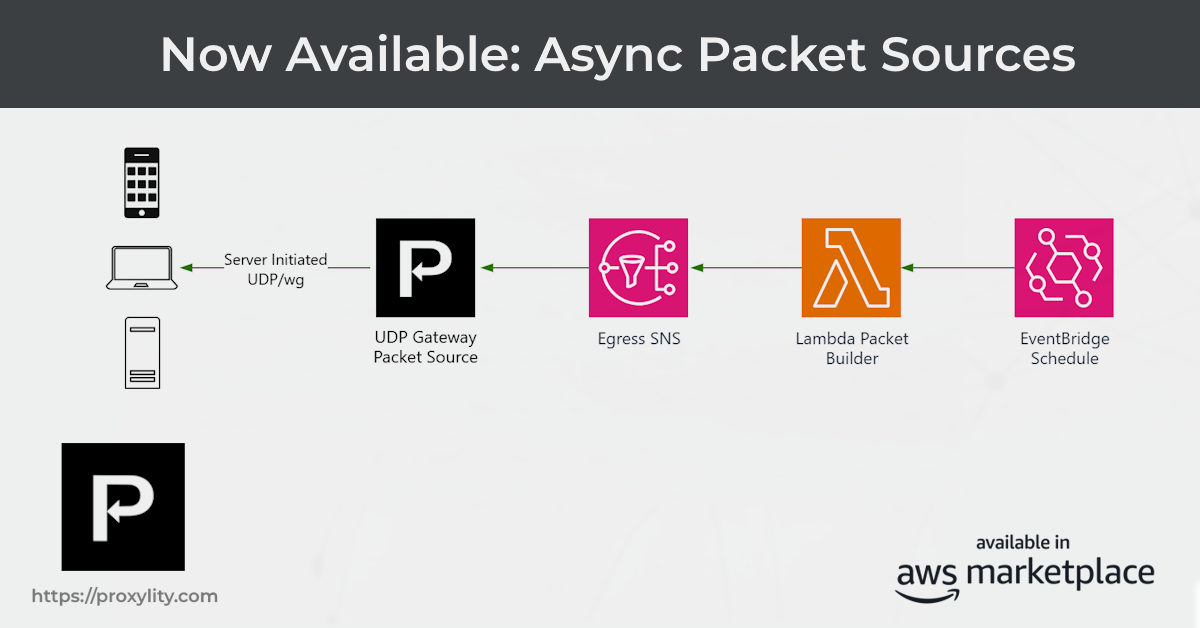
Packet Sources are now generally available to all customers with an AWS Marketplace subscription. With a Packet Source, your application can send UDP packets to connected clients at any time — without waiting for those clients to send a request first. Push notifications, game state updates, over-the-air firmware delivery, async acknowledgements: they're all straightforward to build now, on top of the same Listeners you already use for inbound traffic.
We announced the feature in Select Availability back in April. This post covers what's changed since then and what you need to know to get started.
What Changed Since Select Availability
The design described in the original article — an SNS topic in your account bound to a Listener via a CloudFormation resource — is the same. But several things have been refined or added since April.
Message format
Each SNS message body must now wrap packets in a Messages array. This unlocks fan-out:
a single SNS publish can deliver to multiple clients in one operation, which is useful for
broadcasting game state or sensor commands to a group of peers.
{
  "Messages": [
    {
      "Data": "AQIDBA==",
      "Remote": { "Address": "203.0.113.42", "Port": 4567 }
    }
  ]
}
The Remote object uses the field name Address (not IP, as shown
in the earlier article). The rest of the structure is unchanged.
EgressRegion — required message attribute
This is the most important operational detail. Proxylity subscribes one SQS delivery queue per
supported AWS region to your SNS topic, each with a filter policy keyed on the
EgressRegion SNS message attribute. You must set this attribute on every publish;
without it the message matches no filter and is silently discarded — no packet is delivered.
Set EgressRegion to the AWS region where you want the packet to exit the network.
For replies to inbound packets, use the IngressRegion value from the original packet
JSON — this ensures the reply takes the same regional path the client's traffic entered, which is
required for WireGuard session compatibility.
import boto3, json, base64

sns = boto3.client("sns")
payload = b"\x01\x02\x03\x04"

sns.publish(
    TopicArn=REPLY_TOPIC_ARN,
    MessageAttributes={
        "EgressRegion": {"DataType": "String", "StringValue": "us-east-1"}
    },
    Message=json.dumps({
        "Messages": [
            {
                "Data": base64.b64encode(payload).decode(),
                "Remote": {"Address": "203.0.113.42", "Port": 4567}
            }
        ]
    })
)
All formatters are supported
The select availability release only supported base64 encoding. The GA release supports
all the same formatters available to Destinations: base64, hex,
utf8, ascii, and coap. Specify the optional
Formatter field in each message entry; it defaults to base64 when
omitted.
WireGuard Support
Packet Sources work with both plain UDP Listeners and WireGuard Listeners. For WireGuard you set
Remote.PeerKey to the base64-encoded public key of the target peer; the Gateway looks
up the active WireGuard session for that key and encrypts the packet before delivery. If no session
exists for the key, the packet is dropped.
If your WireGuard Listener has DecapsulatedDelivery enabled, sourced packets must
also include an Inner block with inner IP/UDP addressing so the Gateway can
re-encapsulate the payload correctly before sending it through the tunnel:
{
  "Messages": [
    {
      "Data": "AQIDBA==",
      "Remote": {
        "Address": "203.0.113.42",
        "Port": 51820,
        "PeerKey": "base64encodedWireGuardPublicKey=="
      },
      "Inner": {
        "SourceAddress": "10.0.0.1",
        "SourcePort": 53,
        "DestinationAddress": "10.0.0.2",
        "DestinationPort": 12345
      }
    }
  ]
}
Setting Up a Packet Source
The CloudFormation resource is Custom::ProxylityUdpGatewayPacketSource. It binds an
SNS topic you own to a named Listener. Proxylity assumes the role you provide to subscribe its
delivery queues to the topic; those subscriptions are removed automatically when you delete the
resource.
The IAM policy for the role must be attached before CloudFormation attempts to create the Packet
Source, so use DependsOn to enforce the ordering:
ReplyTopic:
  Type: AWS::SNS::Topic

ProxylitySubscribeToTopicPolicy:
  Type: AWS::IAM::Policy
  Properties:
    PolicyName: ProxylitySubscribeToTopicPolicy
    PolicyDocument:
      Version: "2012-10-17"
      Statement:
        - Effect: Allow
          Action:
            - sns:Subscribe
            - sns:Unsubscribe
            - sns:ListSubscriptionsByTopic
          Resource: !GetAtt ReplyTopic.TopicArn
    Roles:
      - !Ref RoleForProxylity

ReplySource:
  DependsOn:
    - ProxylitySubscribeToTopicPolicy
  Type: Custom::ProxylityUdpGatewayPacketSource
  Properties:
    ServiceToken: !FindInMap [ProxylityConfig, !Ref "AWS::Region", ServiceToken]
    ApiKey: !FindInMap [ProxylityConfig, Account, ApiKey]
    ListenerName: !Ref MyListener
    SnsTopicSource:
      TopicArn: !GetAtt ReplyTopic.TopicArn
      Role: !GetAtt RoleForProxylity.Arn
Example: CoAP Observe with a WireGuard Listener
The best place to start is the CoAP Time Service in the Proxylity examples repository. It deploys a fully working CoAP server on AWS — complete with RFC 7641 Observe (server-push subscriptions) and RFC 6690 Discovery — and is the canonical example of Packet Sources used in production.
The service responds to CoAP GET /time requests with the current UTC time. Clients
can also subscribe with the Observe option to receive a push notification every minute without
sending another request. That minute-cadence push is entirely driven by a Packet Source.
Architecture
All traffic travels through a WireGuard Listener with DecapsulatedDelivery enabled.
Inbound CoAP packets are decoded by Proxylity's coap formatter and delivered as
structured JSON to an Express Step Functions state machine, which handles routing, Observe
registration, and per-request responses. Subscriptions are stored in a DynamoDB table with a
180-second TTL.
An EventBridge Scheduler fires a Lambda function every minute. It scans the subscription table
and publishes one CoAP NON notification per active subscriber to the SNS reply topic. A Packet
Source bound to that topic delivers each notification back to the subscriber through the same
WireGuard Listener — with the coap formatter re-encoding the JSON back into a
binary CoAP packet before it leaves the gateway.
The outbound envelope the Lambda publishes looks like this:
{
  "Messages": [
    {
      "Formatter": "coap",
      "Data": "{\"Type\":1,\"Code\":\"2.05\",\"MessageId\":4711,\"Token\":\"AQID\",\"Options\":[{\"Number\":6,\"Value\":\"AB0=\"},{\"Number\":12,\"Value\":\"\"},{\"Number\":14,\"Value\":\"PA==\"}],\"Payload\":\"MjAyNi0wNi0wOFQxMjowMDowMFo=\"}",
      "Remote": {
        "Address": "203.0.113.5",
        "Port": 51820,
        "PeerKey": "base64encodedWireGuardPublicKey=="
      },
      "Inner": {
        "SourceAddress": "10.10.10.21",
        "SourcePort": 5683,
        "DestinationAddress": "10.10.10.20",
        "DestinationPort": 5683
      }
    }
  ]
}
Two things are worth noting here. First, Formatter: "coap" applies on the outbound
path: the Data field is a stringified JSON CoAP message that Proxylity re-encodes into
binary before sending. Second, the Inner block is required because the Listener has
DecapsulatedDelivery enabled — Proxylity uses it to re-encapsulate the payload into an
inner IP/UDP frame before WireGuard encryption, so the client sees packets arriving with the expected
inner tunnel addressing.
Observe sequence numbers without a counter
RFC 7641 requires that each notification carry a strictly increasing Observe sequence number (Option
6) within a 128-second comparison window. The Lambda uses a neat trick to satisfy this without
maintaining persistent state: it derives the 24-bit sequence number from
UnixEpoch mod 2²⁴. Since exactly 60 seconds elapses between sends, each value is
always greater than the previous within the comparison window, and the approach survives Lambda cold
starts and restarts without any counter storage.
Deploying the example
The example deploys with AWS SAM. Full instructions are in the repository README; the short version is:
wg genkey | tee client.key | wg pubkey > client.pub
sam build && sam deploy --guided \
  --parameter-overrides WireGuardClientPublicKey=$(cat client.pub)
Once deployed, a WireGuard tunnel configuration is generated from the stack outputs and you can
test with any CoAP client. The README includes instructions for using coap-client from
libcoap and for setting up the tunnel alongside other active WireGuard interfaces without conflicts.
Example: Raptor Object Transfer
The Raptor project uses a Packet Source for a different purpose: acknowledgements in a reliable UDP transfer protocol. A sender encodes a file with RaptorQ fountain codes and floods packets at a WireGuard Listener; Lambda functions reassemble blocks as they arrive. As each block is decoded, the block-completer Lambda publishes an acknowledgement to the SNS reply topic, which Proxylity delivers back to the encoder through the same Listener. The encoder stops retransmitting blocks that have been acknowledged, turning an unreliable UDP flood into a reliable transfer.
Raptor is a good reference for multi-Lambda architectures and for seeing Packet Sources used in a pipeline rather than a request/response pattern.
Billing and Availability
Packets delivered via a Packet Source are billed at the same per-packet rate as inbound packets, consistent with your subscription tier. There is no separate charge for the feature itself.
Packet Sources are available today to all customers with an AWS Marketplace subscription. No approval or waitlist — deploy the CloudFormation resource and start publishing.
Documentation
The full reference documentation is now live:
- Packet Sources — conceptual overview, UDP vs WireGuard differences, IAM requirements, error handling
- PacketSource CloudFormation Reference — complete property reference, SNS message format specification, and per-type examples